Salon Website Guide: What to Include to Get More Bookings
By Nishant · · 4 min read
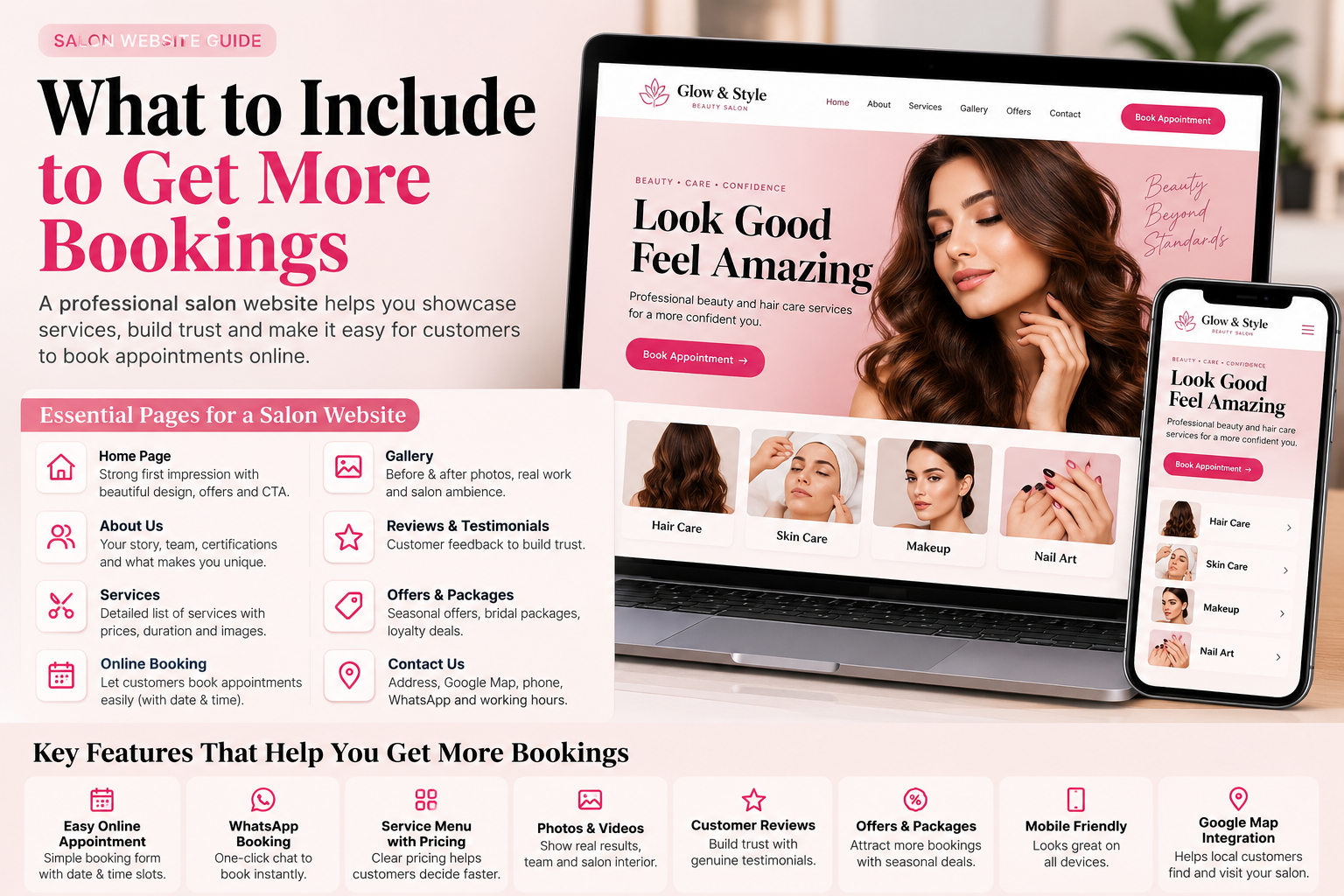
Salon customers usually find you on Instagram or Google Maps. Before they book, they check three things: what you charge, what your work looks like and how easy it is to get a slot. A salon website brings all three into one place that you control, and it ranks for searches like “salon near me” and “bridal makeup in [area]” that Instagram doesn't.
What every salon website needs
A price list
Customers look for prices first. List services by category (hair, skin, nails, men's grooming) with starting prices. “Starting from ₹” is fine when final prices depend on hair length or products.
Services with photos
Short descriptions of each service with a real photo from your salon. Stock photos make customers suspicious.
Bridal and party packages
Bridal bookings are usually high-value and planned weeks ahead. A clear package section, with what is included and a trial option, brings these enquiries in.
Gallery
Your best before-and-after and finished looks. Link to your Instagram, but keep a gallery on the site so visitors don't leave.
Booking form and WhatsApp
Name, phone, service and preferred time. Most salons confirm on WhatsApp, so add a WhatsApp button as well. Here is how to add one.
Location, hours and map
Address with a landmark, an embedded map, timings and the weekly off. Match these exactly with your Google Business Profile.
Team and hygiene
Stylist names and experience, plus a line on hygiene: sterilised tools, disposable kits. Customers often ask about this before a first visit.
Getting found on Google
- Put your area in the page title and headings, for example “Unisex salon in Janakpuri”.
- Give bridal makeup, keratin and other high-value services their own section or page.
- Ask happy customers for Google reviews and link to your profile from the website.
- Add local business schema so Google reads your hours and address. See schema markup for local businesses.
Salon website vs Instagram only
Instagram is good for showing work, but it can't rank for “salon near me”, can't hold a full price list neatly, and you don't own the account's reach. A simple website does all three and sends people to Instagram for more photos.
Templates for salons and beauty businesses
Our salon and spa website templates include service menus or price lists, booking forms and WhatsApp buttons:
- Glow Studio, a salon website template for beauty parlours, spas and makeup artists, with bridal packages
- The Gentleman's Cut, a free barber shop and men's salon template
- Glam by Riya for bridal makeup artists
Frequently asked questions
What should I put on my salon website?
A price list, services with real photos, bridal packages, a gallery, a booking form, a WhatsApp button, address with map, hours and your team.
Should a salon show prices on its website?
Yes. Prices are one of the first things customers look for. Use starting prices where the final cost depends on hair length or products.
Is there a free salon website template?
Yes. The Gentleman's Cut, a barber shop and men's salon template on Web Template Hub, is free.
How can my salon rank on Google?
Use your area name in titles and headings, keep your Google Business Profile consistent with the website, collect reviews, and give key services their own sections.