Gym Website: What to Include to Turn Searches into Walk-ins
By Nishant · · 4 min read
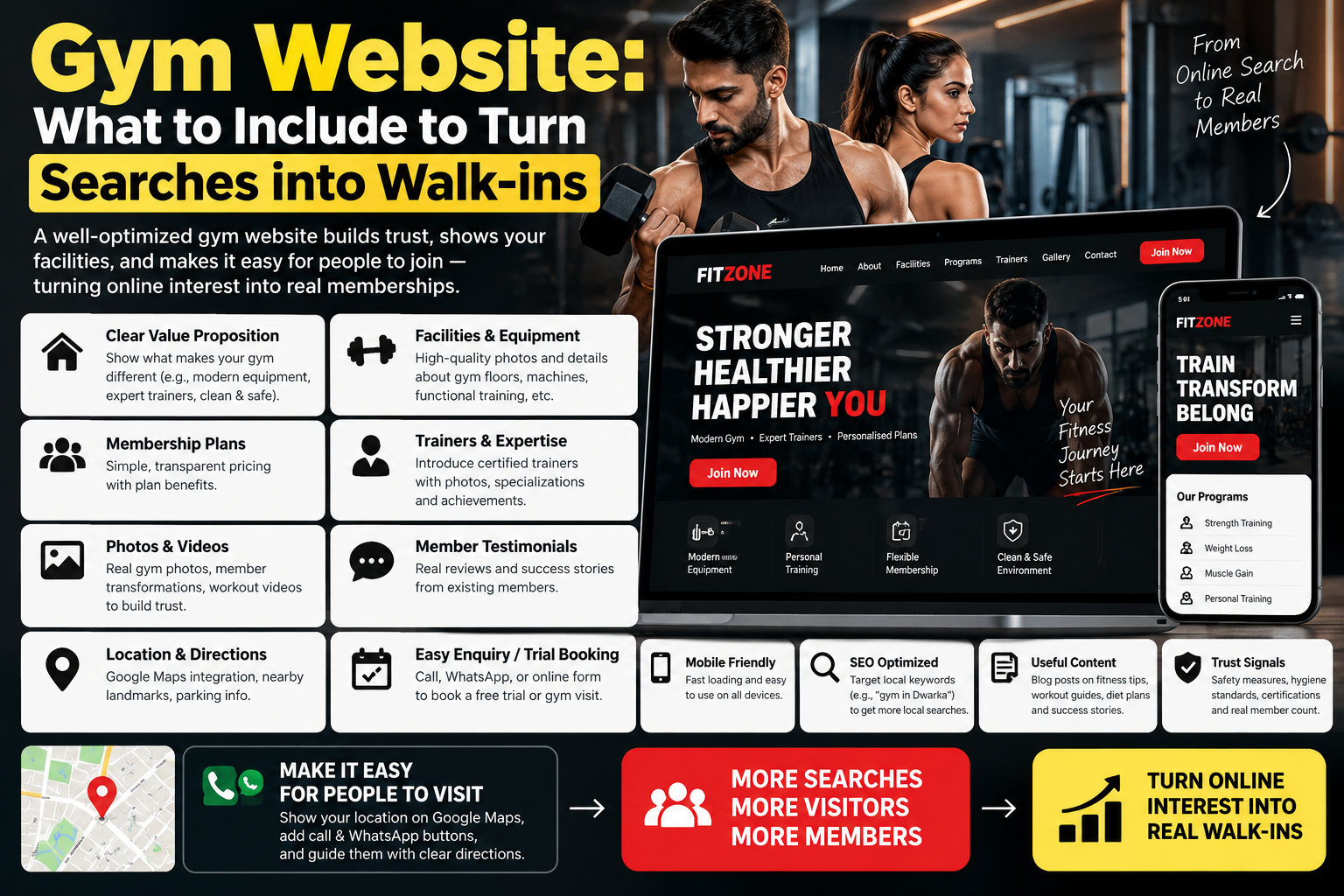
Most people choose a gym within a few kilometres of home or work. They search “gym near me”, open two or three results and compare the same things: monthly fees, timings, equipment, trainers and whether they can try it first. A gym website that answers those questions in the first scroll wins the trial visit; one that hides prices behind “call for details” usually loses it.
What every gym website needs
Membership plans with prices
Monthly, quarterly, half-yearly and annual plans side by side, with what each includes (personal training sessions, diet consultation, locker, steam). If prices vary by branch or offer, show a “starting from” price. Visitors who can't find a price may simply move on to the next gym.
A free trial or first-visit offer
Often the strongest call to action for a gym. A short form (name, phone, preferred time) plus a WhatsApp button turns a browser into a walk-in. Here is how to add a WhatsApp button.
Timings and class schedule
Opening hours, separate ladies' batches if you run them, and a weekly schedule for group classes such as Zumba, yoga, CrossFit or functional training.
Trainers
Photo, certifications and specialities for each trainer. People join gyms for the people as much as the equipment.
Equipment and facilities
Real photos of the floor, cardio area, free weights, changing rooms and parking. Stock photos of models make visitors suspicious.
Transformations and reviews
Member transformations (with written permission) and a link to your Google reviews. Avoid unrealistic promises such as guaranteed weight loss in a fixed number of days.
Location and map
Full address with a landmark, an embedded map and the areas you serve, for example “gym in Sector 14, Gurugram, near…”.
Getting found for “gym near me”
- Keep your name, address, phone and hours identical on the website and Google Business Profile.
- Use your locality in the page title and main heading.
- Give each major service its own section or page: personal training, ladies' gym, CrossFit, yoga.
- Add local business schema (ExerciseGym). See schema markup for local business websites.
- Collect Google reviews from new members after their first month.
Gym website vs Instagram only
Instagram is good for transformations and reels, but it doesn't rank for “gym near me”, can't hold a clear price table and doesn't capture trial bookings in one place. Use the website as the base and Instagram to send people to it.
Templates for gyms and fitness studios
Our gym and fitness website templates come with enquiry forms and call and WhatsApp buttons:
- IronPulse, a gym website template for gyms, CrossFit boxes and fitness studios, with membership plan cards, class listings and a free-trial form
- Shanti Yoga for yoga studios and wellness classes
Frequently asked questions
What should a gym website include?
Membership plans with prices, a free-trial form, timings and class schedule, trainer profiles, real photos of equipment, reviews, and address with map.
Should a gym show membership prices online?
Yes. Prices are one of the first things people compare. Show starting prices if offers or branches change the final amount.
How can my gym rank for gym near me?
Keep your Google Business Profile and website details identical, use your locality in titles and headings, collect reviews and add local business schema.
How much does a gym website template cost?
IronPulse, our gym website template, costs ₹999 one time, paid by UPI.